Payment successfully
completed
Dear Customer
Thank you for placing the order now before we share the QR code,
let’s show you how to
install. Cool?
Dear Customer
Thank you for placing the order now before we share the QR code,
let’s show you how to
install. Cool?
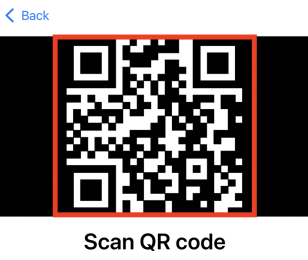
Step 1: You'll need to scan the QR code we will share at the end of these instructions
Make sure you have good internet connection before you start the install process
Do not interrupt the eSIM installation process
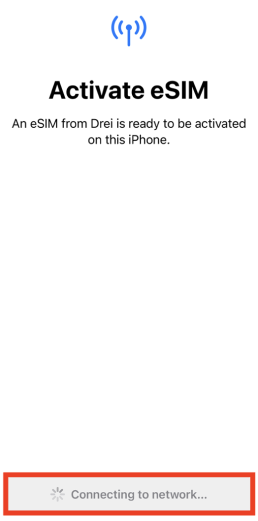
Do not interrupt the eSIM installation process as it will take a few minutes to download/install the eSIM.
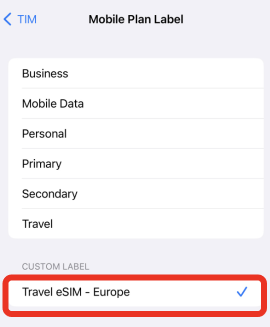
Set a Custom Label for your plan similar to the example above
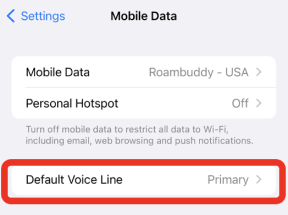
You can keep your Primary line for Voice/SMS and switch your Mobile Data to the newly installed eSIM line once you’ve set it ON
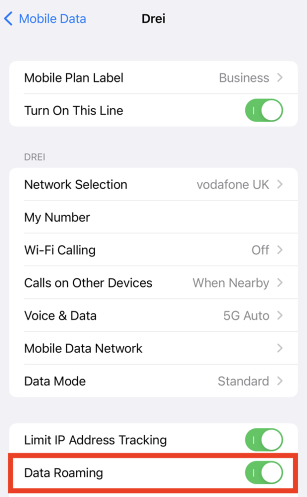
Set Data Roaming to ON once the line is turned ON
Please don’t forget
The eSIM can be downloaded onlyONCE
PleaseDO NOT DELETE/REMOVE the eSIM cellular plan from your phone settings until you are done using it. ONCE DELETED THE eSIM CANNOT BE RESTORED Please follow the activation steps and contact us if you need any assistance
Do not interrupt the eSIM installation process
Once you start installing your eSIM, DO NOT Interrupt the installation, you may run into an installation error
Do not interrupt the eSIM installation process
Once you start installing your eSIM, DO NOT Interrupt the installation, you may run into an installation error